Background:
Product
Software Risk Manager is an application security posture management tool that correlates & analyzes results from 130+ tools
The Sales Teams reported that customers:
- Could clearly see the need for this tool and how it could help their business.
- Were not willing to buy it due to how administrative time it took to get scans.
Project Summary
For customers to effectively use Software Risk Manager’s capability to integrate with 130+ tools, we needed to create a way to connect and update tool connections in bulk.
Team
UX Designer (Me)
1 Product Manager
5 Developers
My Responsibilities
- Facilitated scope alignment
- Conducted requirements analysis
- Designed and prototyped solutions
- Led workshop facilitation
- Managed stakeholder relationships
- Performed system research
Problem
Initially, each project on Software Risk Manager required its own individual connection to each tool. When passwords expired (typically every 90 days due to security policies) administrators had to:
- Navigate to each individual project
- Locate the specific tool configuration
- Update the credentials
- Test the connection
This took 2 minutes per tool per project.
For a typical enterprise customer managing 1,000 projects, even with just 3 tools, this meant over 100 hours of purely administrative work every quarter. (2.5 weeks of a full-time employee doing nothing but updating passwords)
“We love the capabilities. It’s so powerful. But we can’t buy it if the setup and maintenance take this long. We just don’t have the hours.”
Customer Feedback
The requirement was not realistic. No matter how valuable the security analysis was, customers couldn’t justify dedicating this much time to maintenance.
Results
Software Risk Manager created a feature for bulk tool connection, which included being able to create connections, option sets, and scheduling. It also had the ability to import projects from 3rd-party tools, which optionally could be matched to existing projects or create new projects in Software Risk Manager.

$3 million+ additional revenue generated

Enterprise customers saved 100 hours per quarter

3 new contracts immediately
Initial Exploration
The product manager and I discussed approaches to handle the major sales blocker presented by sales, prioritizing an MVP to decrease dev load and speed to completion.
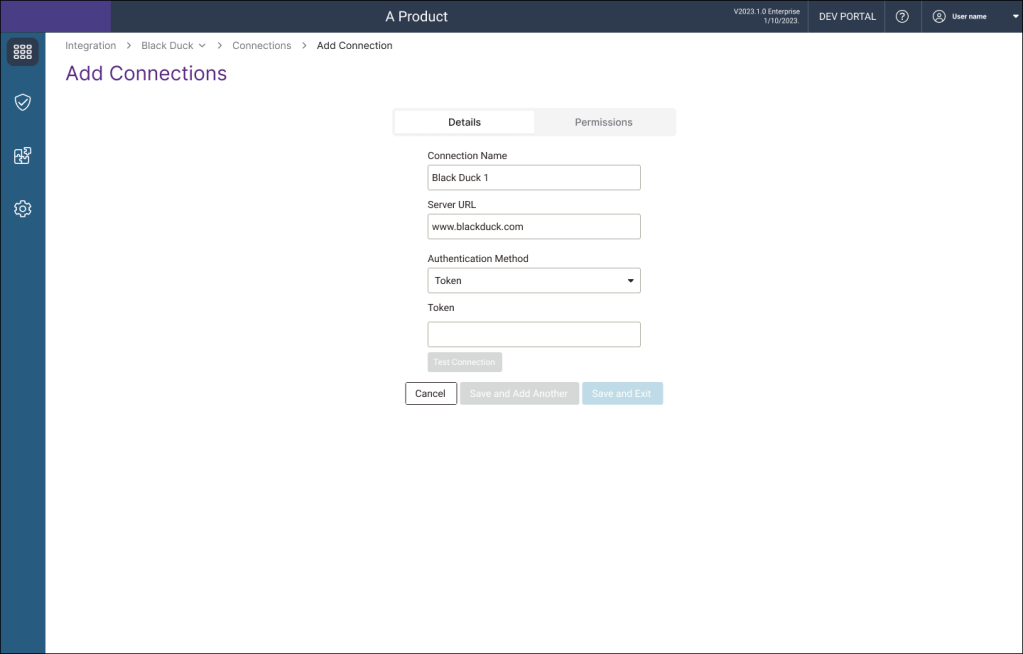
| ✅ Option 1 MVP: Password Management | ❌ Option 2 Solving the root problem: Central Tool Configuration |
| Create a place to store URL and Password combinations to be applied to projects | A central place to manage connections and configuration to projects in bulk |
| + Minimal rework for developers | + Comprehensive solution |
| + Minimal relearning for current users | + Faster to set up the security environment |
| – Minimal improvement | – Large undertaking from developers |
Because it was a small team with a constant workload, we prioritized Developers’ time and reducing the need to relearn the system, we at first chose to pursue the MVP solution. I created a design that would work for minimal disruptions.
I facilitated a strategic pivot by leading a prototype review and securing alignment on centralizing configuration for scalability and compliance.
In a meeting between, product manager, the engineering manager, lead engineer, and me, we discussed the problems
- Confusion when there are multiple instances of the same tool
- Onboarding takes too long
- Replacing a tool takes too long
- Would not increase sales
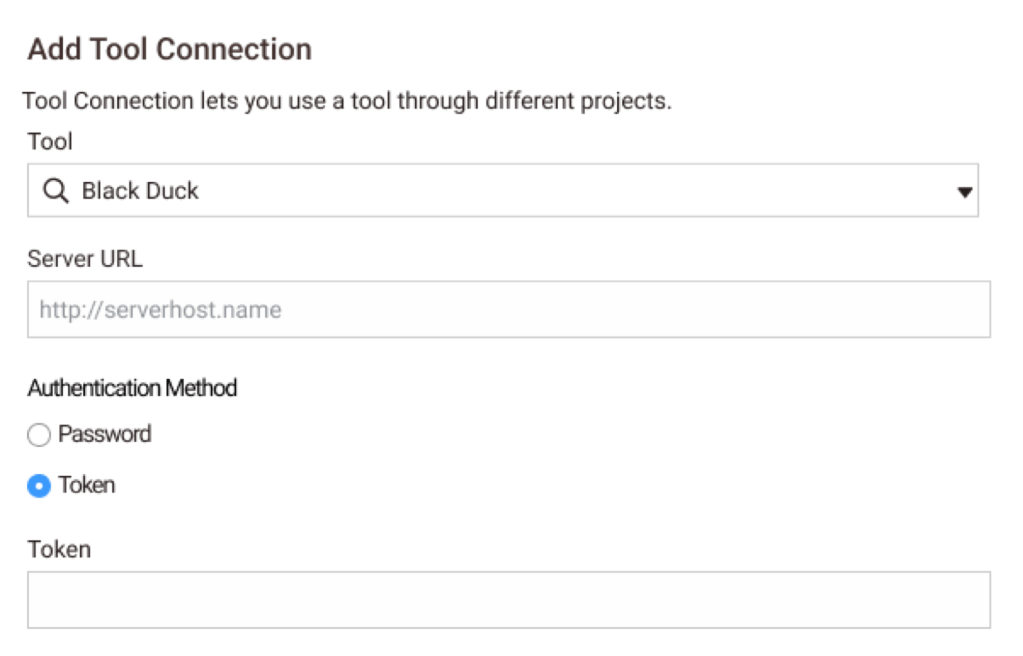
After seeing what this would look like, we decided that we could not settle for MVP; it would be lacking too many capabilities. So I did further research into what making a central tool configuration area would be like.
I conducted a comprehensive analysis of all tool configuration flows, facilitating SME workshops and audits, aiming to understand what aspects could be handled in bulk
| Type | Description |
| External Tools | From 3rd party: requires a connection, schedule, and a configuration |
| Embedded Tools | Already built in: requires scheduling and options, but not a connection |
| JSON Upload | Tools get used by uploading a file. No connection, schedule, or options |
| Informational Tools | These tools are already working, and there is no customization. Users just need to be able to reference |
Because a Policy workflow was recently developed using a wizard to build, my first idea was to use a wizard to reduce the need to learn new behaviors.
Format Iterations
I led the evaluation of a wizard-style configuration design, where the process would guide users to ensure all steps of configuration were handled.
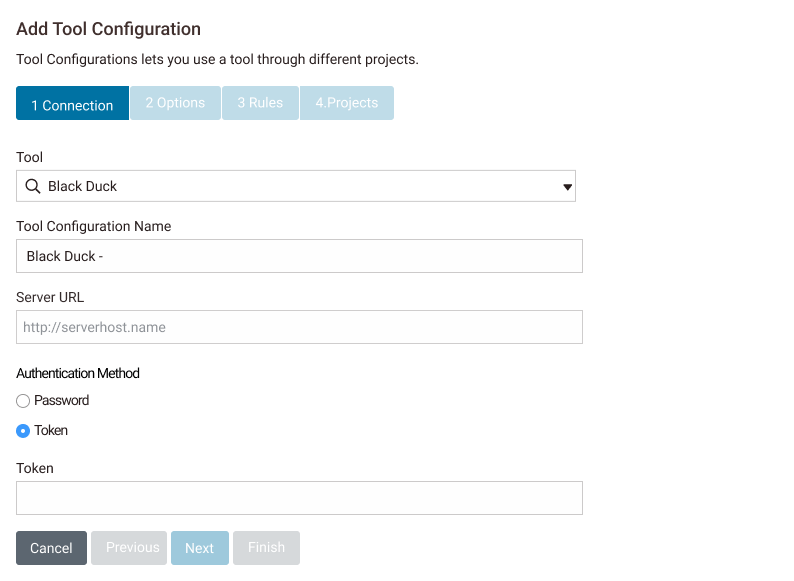
- ⛓️ Too restrictive
This pairs concepts that shouldn’t be paired - 🌫️ Unclear
This made sense for onboarding more than maintaining - ♻️ Needs more reusability
Connections, configurations, and schedules are not 1:1:1
Like the MVP, this did not have the needed capabilities, so I needed to pivot again. This pattern would still be mostly similar to something that already existed.
I transitioned from a wizard-based design to a tabular navigation interface, simplifying the user experience to be both flexible and robust while maintaining usability and workflow integrity.
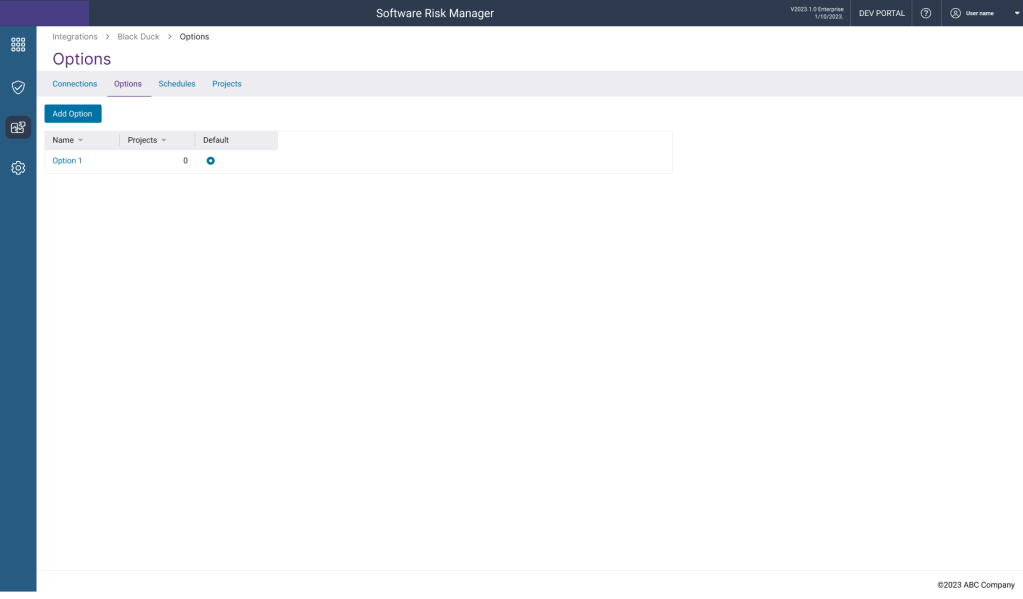
- ❄️ Flexible
Any number of connections, configurations or schedules could be made - 🏖️ Clear paths
Easy to find a section and add instead of needing to scroll through areas - 🧹Orderly
Keeps a similar step order to wizards, without forcing - 💪 Robust
Including default options and a one-entry minimum for options and schedule ensures successful configuration
With the format decided upon, I began to look at the finer details.
Final Design Details
I mapped and compared workflows for single and multi-project configurations, identifying project-specific requirements and key differences in permissions and relationships. Collaborated with SMEs and developers to ensure comprehensive coverage.
Single Project Flow tests connection at the end

Bulk Flow must test at creation
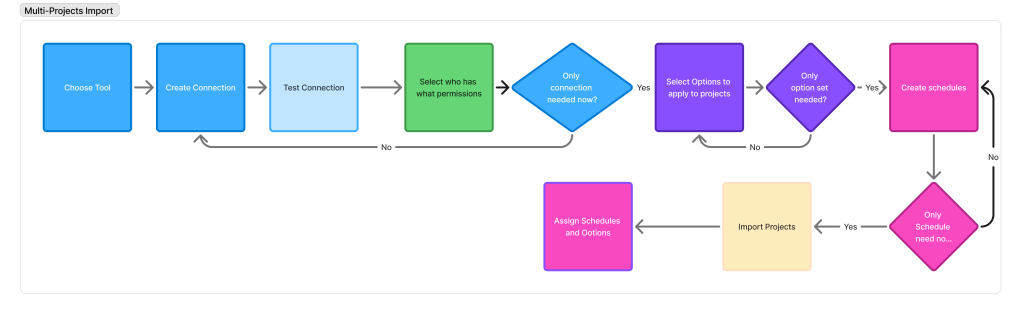
From plotting out the workflows, I was able to ensure that we would have something that worked. But at this point, there were still areas in which the solution would fail or create difficulties.
I collaborated with engineering to implement validation and error-handling mechanisms to ensure secure and reliable connections, including access controls and role-based permissions.
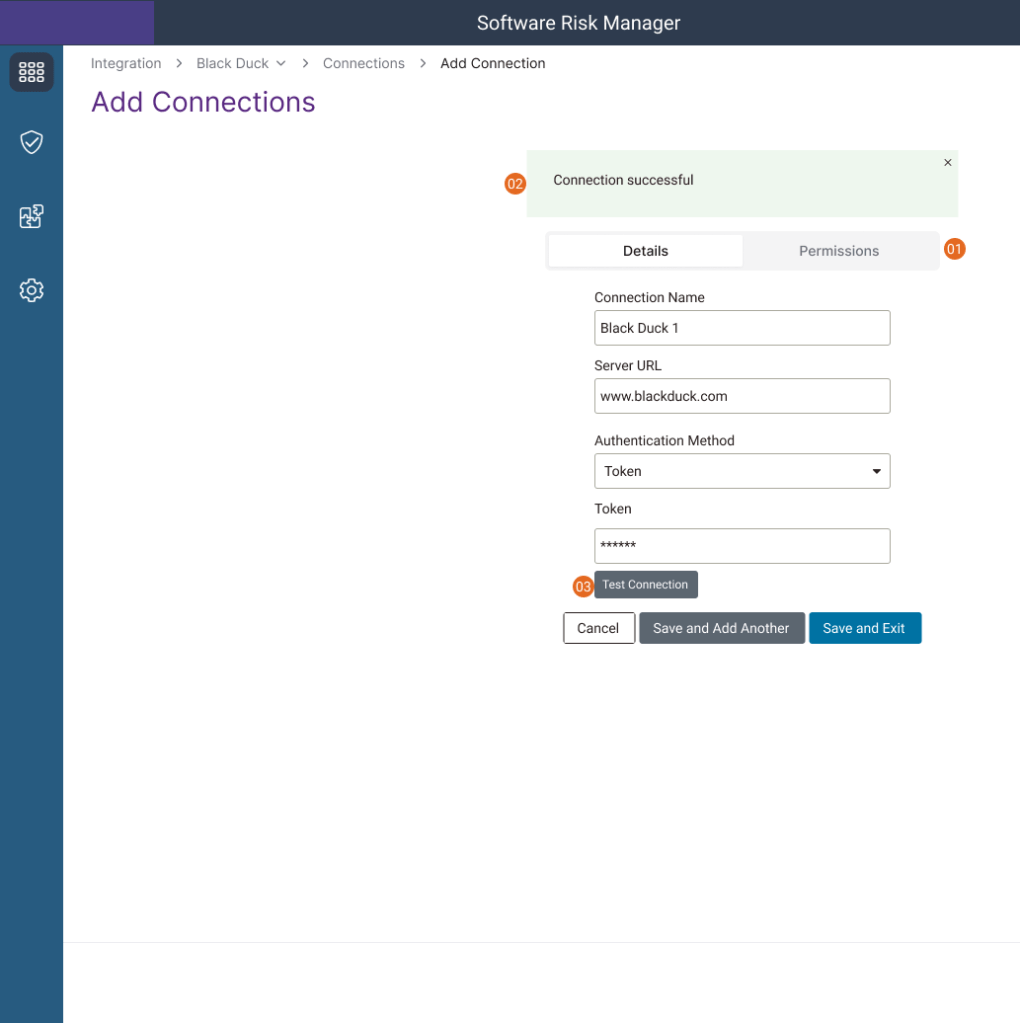
- Ability to select who has permission
- Status to prove connection was successful
- Ability to test the connection
Connection was the most complicated aspect, and once that was completed, we were able to quickly decide on what schedules and option sets would look like. We still needed to solve what integration would be like.
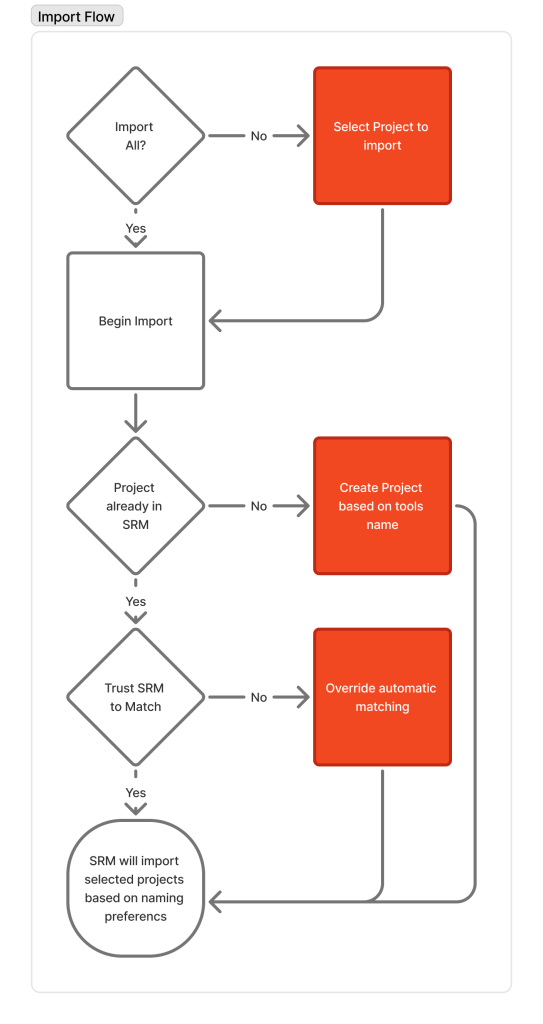
I designed flexible import flows for third-party project integration, balancing automation with user control and handling complex scenarios like duplicate project names.
Points of Consideration
- To optimize for onboarding, only projects that have never been imported could be imported
- The happy path would be if pairings could just happen automatically, but error handling must happen
- Tools could have different concepts of a project
- Tools could have different names and structures from other tools and from Software Risk Manager
While projects could be imported, tools need to address different branches. When triaging issues, one needs to know if issues have been fixed on a developer’s branch but not on the product branch, or if building a new feature is introducing new issues that will one day be on the product branch if not handled. Therefore, we need to handle importing branches.
I developed a prototype for branching control that allowed users to manage and update branches independently, providing scheduling flexibility and tailored update frequencies. Stakeholder feedback guided refinements, ensuring the design balanced precision, usability, and efficient code management.
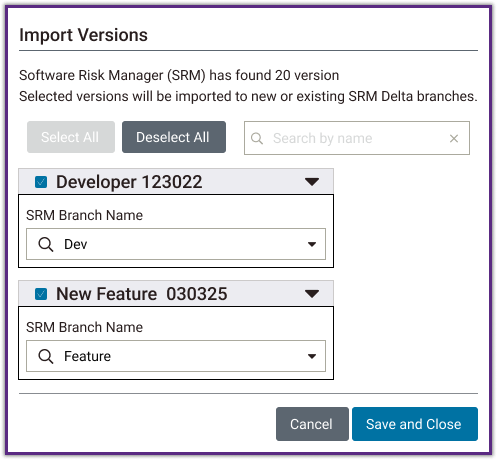
Not all scans are associated to a branch, and they would still need to have results shown.
Then we integrated handling of headless calls, giving users control over one-off scans and ensuring comprehensive data management. Collaboration with engineering and stakeholder feedback refined the approach, completing the import functionality while maintaining flexibility and usability.

Outcomes
We completed this feature ahead of schedule and in time to present at Black Hat 2023. The release was highly successful.
$3 million+ additional revenue generated
Enterprise customers saved 100 hours per quarter
3 new contracts immediately
The Next Steps Would Be Adding More Flexibility to Service We Were Providing By Conforming More To Mental Models
We finished creating the first version, but we noted additional features for V2
- Notifications
We need to add a method to track and alert when passwords are expiring. Currently, administrators must track expirations manually outside the system or discover issues when scheduled updates fail. - Easy single project implementation
This replaced single project implementation, but there could still be individual needs, such as testing a tool. Currently, the act of configuring one project had to be handled in a place to configure many. This doesn’t fit users’ mental models - Better Mental Model for Schedules
A schedule would need to be recreated for each tool, which is repetitive. Also, unlike with options, there is more expected variance based on branch type.
We Learned That Going From A Theoretical MVP to a Systems That Solves Real-World Problems Led To Our Success
Instead of just delivering a minimal solution, we made sure that the solution and the product were viable, and this pleased the customers, which increased sales. We noticed:
- The Feature was completed ahead of schedule
- Enterprise Customers saved ~ 100 hours / Quarter
- $3m revenue generated by removing a deal-breaker
- Customer satisfaction increased, and they wanted to talk about new opportunities, like having this on-premise solution turned into a cloud-based solution
 Phoenix Ehmann Product and Service Designer