Executive Summary
Business Challenge:
Enterprise customers recognized the technical superiority of Code Dx but refused to purchase due to excessive setup and maintenance time.
Duration:
8 weeks to design path for bulk updating passwords.
Team:
- 1 UX Designer (me)
- 1 Product Manager
- 5 Developers
My Approach:
Minimize changes to reduce the amount of relearning and time to deploy the solution, but also design a significant architectural change.
Solution:
Transformed configuration model from distributed (project-level) to centralized (platform-level) with inheritance, eliminating 100+ hours of recurring quarterly maintenance.
Impact:
- $3M+ in additional revenue from previously blocked enterprise deals
- 100+ hours of quarterly work eliminated (not reduced) 3 new contracts signed immediately after launch
- Top 20 Hottest Product at Black Hat 2023
Skills Demonstrated:
- Service Architecture Design
- Strategic Pivoting
- Stakeholder Alignment
- Root Cause Analysis
- Cross-functional Leadership
- Wireframes
Background
Product Context: Powerful engine for vulnerability aggregation
CodeDx was an application security posture management tool that correlates and analyzes results from 130+ tools. It aggregates test to identify vulnerabilities across their entire application portfolio.
Technical Constraints: Product deep in design debt
- No customer access (enterprise security policies prevented direct UX research)
- Legacy codebase (6-year-old system with architectural debt from creating design before having a designer)
- Resource constraints (small engineering team, many competing priorities)
- Timeline pressure (Sales needed solution within 6 months for active deals)
- Compliance requirements (had to maintain SOC2 and security certifications)
These constraints forced me to use SMEs as customer proxies, design within architectural limitations, and prove ROI to justify engineering time.
My Context: Must help product and smooth relationships
I joined Black Duck to take over design for the CodeDx product line. The first designer had changed products after damaging relationships with Product and Engineering. They viewed him as too rigid and making unrealistic demands for redesigns.
This meant I was rebuilding trust in design’s ability to be a strategic partner while making the designs
Problem Unsellable Superior Technical Solution
Sales teams consistently reported the same pattern:
“Customers see the value immediately. They understand how this solves their security visibility problem. They want to buy it. But they can’t justify the setup and maintenance requirements, they walk away.”
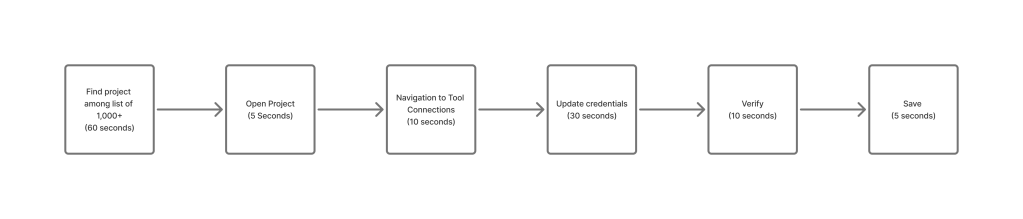
Large enterprises managing 1,000+ projects needed each to be configured individually for each tool. Assuming a password update policy was every 90 days, it translated to 2.5 weeks per quarter heads down work just updating.
Additional Problem

Unknown Blast
Within the system, there is no way to know what other credentials are out of date based on one project having out of date credentials.

Silent Failures
Knowing that credentials were outdated could be seen when one notices a scan fails, no other way to detect.

Audit Nightmare
Maintaining visibility and progress into which updates have happened requires maintaining a record outside of the system.
Exploring Nondisruptive Solutions:
I met with the Product Manager to weigh MVP option vs an architectural change.
| ✅ Option 1 MVP: Password Management | ❌ Option 2 Solving the root problem: Central Tool Configuration |
| Create a place to store URL and Password combinations to be applied to projects | A central place to manage connections and configuration to projects in bulk |
| + Minimal rework for developers | + Comprehensive solution |
| + Minimal relearning for current users | + Faster to set up the security environment |
| – Minimal improvement | – Large undertaking from developers |
We decided that I should design the MVP solution
Given the damaged relationships I inherited, I prioritized creating collaboration over immediately proposing a major architectural change. The MVP approach allowed me to:
- Build trust by delivering something quickly
- Learn the technical constraints from Engineering
- Understand Product’s business pressures
- Show that I valued Engineering’s time; wouldn’t make too asks
- Gather evidence that would support a bigger recommendation
- Create a shift from aggressive negotiations to collaboration.
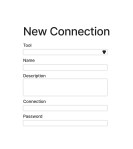
While conducting a review, we agreed this approach would create more work in the long run.
After a week, I held a workshop to review with Product Manager , Engineering Manager , Lead Engineer, and myself to review the Figma prototype. We questioned the more extreme use cases against real customer problems.
We discovered several Issues:
- Confusion when multiple instances of same tool exist
- Onboarding takes too long for new customers
- Replacing a tool is extremely time-consuming
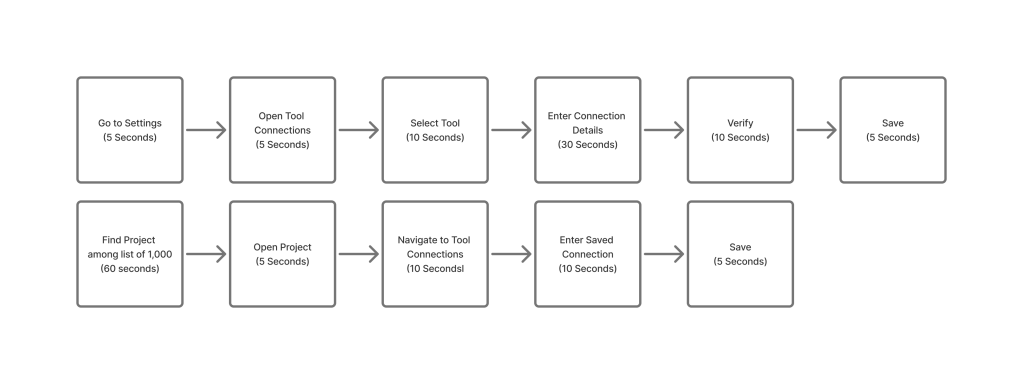
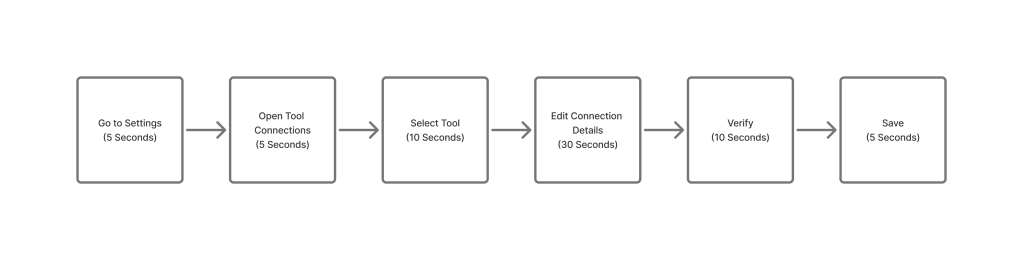
This is one minute to set up the tool and then each project saves 30 seconds. This would still be one day per tool for setup and then maintenance would be one minute per quarter per tool.
My recommendation:
“The MVP improves efficiency , but it doesn’t remove the deal-blocker . Initial set up takes 100 hours. We need to eliminate the burden entirely by changing the service architecture. We can go with this plan. This design is ready. But I am concerned customers will reject it, and it will mean more design and engineering work later.”
Product Manager Response
If development can make the time, we should solve the problem.
Lead Developer response:
Yeah, that makes sense. It’s better to pivot now. Thanks for protecting our time.
After seeing the limitations visualized, the team aligned: We couldn’t settle for incremental improvement. We needed architectural transformation.
Reiteration Centralized Service Architecture
The Redesign
I conducted comprehensive analysis of all tool configuration workflows, working with Subject Matter Experts to understand:
External Tools
Requires:
- Connection
- Option
- Schedule
Embedded Tools
Requires:
- Option
- Schedule
JSON
Requires:
- Upload
New Service Model
Centralized Configuration Architecture:


How this solution would compare.
| Before | After | |
| # Configurations assuming 1000 projects and 3 tools | 3,000 | 3 |
| # Times a tool connection needs to be updated per password rotation | 1,000 | 1 |
| Ease of testing connection health | Very Difficult and hard to track internally | Ease one click |
| Ease to understand connection working | Very difficult must troubleshoot project by project | Easy one source of truth |
| Time to fix | 100 hours (2.5 weeks) | 3 minutes |
My first idea for the new architecture would use the pattern recently created for the Policy Feature, using a wizard to guide administrators through the process. But through discussions with Subject Matter Experts, I learned this pattern wouldn’t work.
- ✅ Similar to recently-developed Policy workflow, so familiar pattern
- ✅ Reduce learning curve by guiding users step-by-step
- ❌ Too restrictive. It pairs concepts that shouldn’t be paired (connection + options + schedule as 1:1:1)
- ❌ Sequencing would work for setup, but the life cycle of products would require being able to change schedules, so it wouldn’t work in maintenance.
Although it would make setup easy, and we could delight customers early, it didn’t fully fit the need for flexibility in the ecosystem.
For certain tools tests have a cost, and we would be forcing them to pay for something that didn’t have value, testing a project where changes aren’t being made. This would prevent customers from renewing.
So I tried a new architecture.
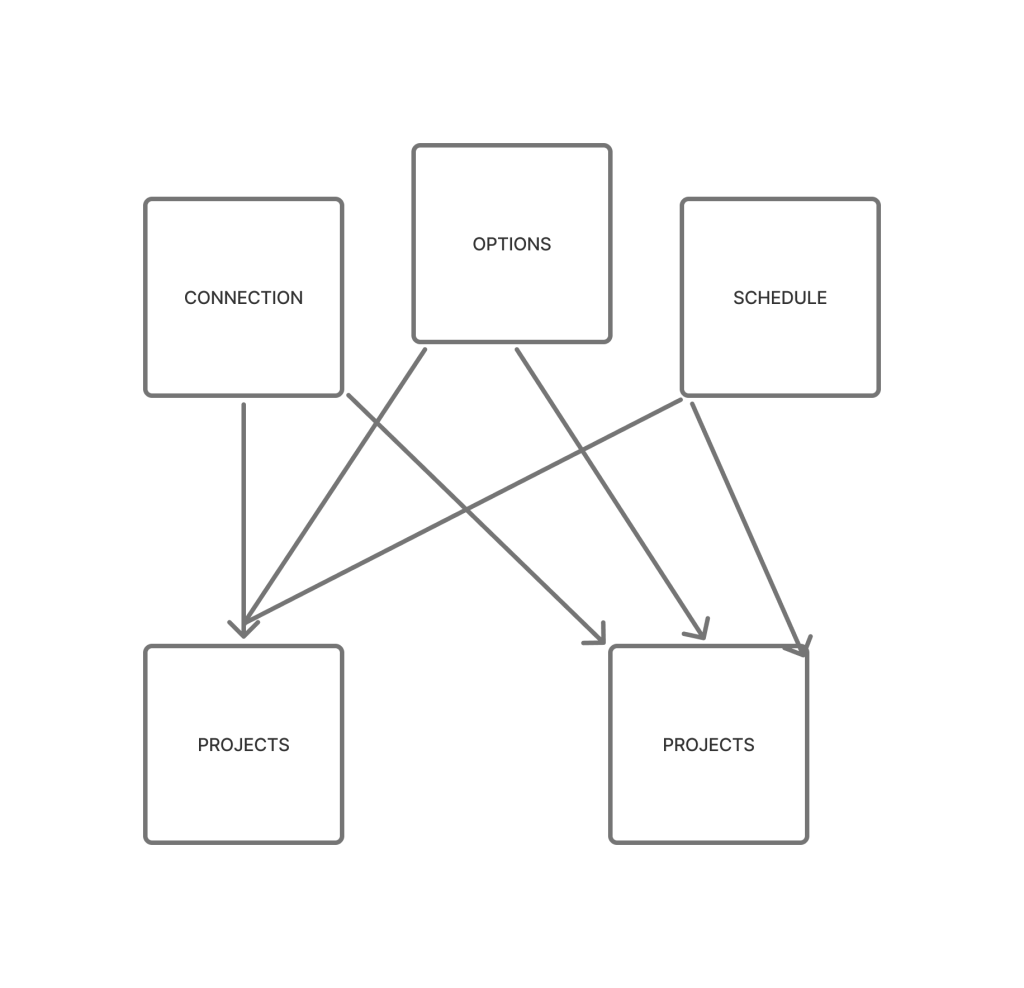
There would be a hub, made through a tabular navigation, where a user could go to each section for what is needed to use a tool. These can be paired to a project however is needed.
- ✅ Flexible: Any number of connections, options, or schedules
- ✅ Clear paths: Easy to find a section and add entries without scrolling
- ✅ Orderly: Maintains logical sequence without forcing linear workflow
- ✅ Robust: Default options and minimum requirements prevent configuration errors

Defining Details
To ensure there wouldn’t be value lost, I mapped the experiences of single vs bulk to see if there was anything not covered.
| Feature | Single-Project Flow | Bulk Flow | Which is Better |
| Connection Test | End when pulling data | Beginning before linking projects | Bulk |
| Project Link | Deliberately specifies | Automtically assumes based on similar project name | Single Specificity beats speed, but not ideal |
| See Scan | Looking at project | Looking at project | Tie |
| Reach of visibility | Only those with permission | Logged in user | Single |
I drilled down on the design to ensure that connections were secure.
This section would require a new set of permission, configuration administrator, what would be the limits of the role’s permission.
First approach:
Select who can edit
All with permission to the section can view.
Advantage:
- Good for super admin ease of use.
- Ensures there are no duplicates.
Disadvantage
- Less secure
- Violates principle of least privileges
Because it did not make sense to have an ASPM product that violated security principles, and because the admin wouldn’t be the one making the changes too often in this setting, I chose to add a point of friction in to create a better service.
Second Approach
The person who creates the connection chooses who edit and view permission, who has just view and who has none. The creator would have edit and view permission by default
Advantage
- More Secure
- Follows the principle of least permissions
Disadvantage
- Super admin could see duplication
- Person with permission to both could see duplication
The disadvantages seemed like it would be more theoretical than in practice
Handling Project Import Complexity
Challenge:
Third-party tools have different project structures and naming conventions than Code Dx
Considerations:
- Tools may have different concepts of “project”
- Names may conflict or duplicate
- Need both automatic matching AND manual override
Solution: Import wizard with smart matching algorithm
- Shows suggested matches
- Allows manual override for edge cases
- Option to create new projects vs. match existing
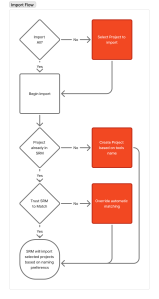
With Project Import complete, I applied a similar pattern to approach branch management
Problem:
Developers branches, production branches, and other branches will be at a different state and the security of both need to be known
- Are issues fixed on developer branch but not production?
- Is a new feature introducing vulnerabilities?
Solution:
Branch import with independent schedule control
Ability to set different update frequencies per branch type
Handling for “headless” scans (one-off scans not tied to branches)

Final Design Details

- There would be tabs to go through all elements of a tool.
- Connection would get all desired projects to be associated with that connection
- Options and Schedules were separate
- There would be a default option and schedule to give to projects, but this could be overridden at the project level.
- A project-level override would give a default to all branches, but an override could be applied to branches
- This design promoted efficiency as the default mode, but was still flexible when needed.

Outcomes
Business Impact
- $3M+ in additional revenue
- Enterprises who previously rejected due to operational burden immediately became customers
- 3 new contracts signed in first month post-launch
- 100+ hours eliminated per enterprise per quarter
Strategic capacity unlocked:
- Security teams reallocated 100+ hours per quarter from administrative overhead to mission-critical work (Analyzing vulnerability trends across the application portfolio)
- Remediating high-priority security issues faster
- Improving security policies and procedures
- Proactive threat hunting and risk assessment
As one customer put it:
“I love the user experience, this saves us so much time.”
Operational visibility gained:
- Blast radius of failures immediately visible:
- Compliance reporting simplified: Single source of truth for multiple tool configurations
- Top 20 Hottest Product at Black Hat 2023
- Industry recognition for solving a real enterprise pain point
- Customer conversations shifted from “operational burden” to “expanding usage”
Engineering efficiency:
- Architectural changes positioned the product for future bulk operations
- Foundation for other centralized management features
Inner-office politics improved:
- Earned mutual respect and trust between the Engineers and me.
- “If Phoenix is recommending it, I’ll support it.” Lead Engineer
- Product Manager viewed me as a strategy partner.
Design Expectation:
- Proved that design can be involved in strategy
- Designers began being treated like they had technical understanding
Lessons Learned
- When the problem is architectural, surface-level improvements won’t unlock business value.
- Strategic pivots require evidence, not opinions.
- When you’re solving a major pain point, users are willing to invest in learning; especially when the new model is objectively simpler.
- Centralization solves scaling problems but creates new governance questions. We should have designed the permission model more thoroughly upfront.
- Delivering quick wins (like the initial MVP exploration) builds the trust needed to ask for major engineering resources later
Next Steps (V2 Roadmap)
Based on customer feedback and usage patterns, these improvements would add flexibility without reintroducing complexity:
- 1. Notifications
- Add proactive alerting when passwords are approaching expiration
- Currently: Admins must track expirations manually or discover failures when scans don’t run –
- Improvement: Email/dashboard notifications 30/14/7 days before expiration
- Single-project override capability
- Allow occasional project-specific configuration at project without breaking centralized model
- Currently: 100% inheritance
- Improvement: Allow set up within the individual project
- Schedule templates by branch type (Grid)
- Reduce repetition in schedule creation
- Currently: Must create separate schedule for each tool
- Improvement:
“Production branches: daily , Dev branches: weekly , Feature branches: on-demand” templates - Recognizes that branch type is more important than tool type for scheduling
 Phoenix Ehmann Product and Service Designer